What is a docket in trucking and civil operations?

A docket is a digital job record that captures who did the work, where, when and how much was moved, delivered or completed on site. In truck and civil operations, it exists to answer three questions the moment a job finishes: what happened, who’s accountable, and how do we get paid for it.
The value shows up fast. A docket with a timestamp and GPS location attached becomes proof-of-work for invoicing, evidence for compliance audits and a way to shut down disputes before they start. Platforms like Dirtchamp are built around this exact job, turning what used to be a paper habit into a live operational record.
A single docket typically supports:
- Invoicing – load, time and quantity details that convert straight into a billing line
- Compliance – timestamped, geo-tagged proof for audits, tenders and regulatory checks
- Payroll and subcontractor verification – confirmed hours and work completed, signed off on site
- Dispute resolution – a record neither party can argue with after the fact
Key Takeaways
A docket becomes defensible evidence only when it captures a timestamp, GPS location, operator identity and signature at the point work happens, not afterwards.
| Point | Details |
|---|---|
| Docket definition | A digital job record capturing load, time, location and sign-off for billing, compliance and payroll. |
| Core fields matter | Timestamps, GPS and signatures turn a docket into audit-ready evidence, not just a form. |
| Digital beats paper on speed | Syncing and searchable records cut reconciliation time and reduce billing disputes. |
| Start with a pilot | Digitise one high-dispute docket template on one crew before rolling out fleet-wide. |
| Dirtchamp fits this workflow | Offers digital pre-starts, dockets and GPS tracking via OBD port with automated billing exports. |
Table of Contents
- What information does a docket actually capture?
- Why accurate dockets matter for cashflow and compliance
- Digital dockets vs paper: what actually changes on site
- How a digital docket works from load to invoice
- A practical checklist for rolling out digital dockets
- See how Dirtchamp handles dockets on site
- Sources
What information does a docket actually capture?
A docket is only as useful as the fields on it. Miss one, and you’ve got a record that can’t be billed, audited or defended if a client pushes back.
- Job or site ID – ties the docket to a specific project or contract
- Date and start/end times – the backbone of any time-and-materials claim
- Load type and quantity or weight – what was actually moved or delivered
- Origin and destination – where the material came from and where it ended up
- Truck or equipment ID – links the work to a specific asset for costing and maintenance records
- Operator or subcontractor name – who did the job, critical for payroll and accountability
- Photos – visual proof of load, site condition or completed work
- Signature or PIN approval – confirms the work was authorised and accepted
- Cost codes and attachments – route the docket straight into the right project ledger
Timestamps and GPS coordinates do the heaviest lifting here. Together they turn a docket from a description of work into evidence of work, which is what makes it usable in an audit rather than just a nice record for the file. Each field maps directly to an admin task: load quantity becomes an invoice line, operator sign-off becomes a payroll approval, and geo-tagged timestamps become the backup a compliance officer asks for.
Why accurate dockets matter for cashflow and compliance
Get the docket right and the flow-on effects hit your bottom line within weeks, not months.
- Invoices go out faster when every line item is backed by a timestamped, geo-verified record instead of a supervisor’s memory of Tuesday
- Disputes drop sharply because clients can’t argue with GPS coordinates and a signature
- Tender and audit readiness improves, since you can produce a full daily record on request rather than digging through a glovebox
The evidence gap costs more than most owners realise. T&M billing depends entirely on verifiable hour and material records, and poor field documentation is one of the leading causes of billing disputes and late payment. If your crew can’t produce a clean daily log, photo, and geofenced clock-in, you’re negotiating from a weaker position before the conversation even starts.
Contract wording backs this up too. Legal definitions of a job docket often treat it as the actual document or invoice issued for work performed, sometimes requiring one docket per day on multi-day projects. That’s not paperwork for its own sake. It’s the record your contract is built on.
Digital dockets vs paper: what actually changes on site
Paper docket books feel familiar, and that’s their only real advantage. They’re cheap, low-tech, and every driver already knows how to fill one in. The problems show up later: pages get wet, torn, lost in a cab, or written in handwriting nobody in the office can read three weeks after the job.
Digital dockets fix the reconciliation headache directly. Records sync the moment they’re submitted, they’re searchable instead of buried in a filing box, and the GPS and timestamp data give you a defensible record if a client or auditor pushes back. The trade-off is real too: you need device management, a plan for patchy site reception, and enough training that field staff aren’t fighting the app on day one.
- Paper – familiar, no tech required, but slow to reconcile and easy to lose
- Digital – instant syncing, defensible evidence, faster billing, but needs offline capability and a short training run
- Hybrid – some operations run both during a transition period, digitising the highest-value docket types first
Pro Tip: Don’t try to digitise every docket type in week one. Pick your highest-dispute or highest-value job category, digitise that template first, and prove the model before rolling it out fleet-wide.
How a digital docket works from load to invoice
The process starts before a driver even picks up a load. A digital docket pre-fills job and truck details from the system, and some platforms trigger ticket creation automatically once a truck crosses a geofenced boundary at the pit, site or depot.
- Create at load or start – job and truck details are pre-filled, with an optional geofence trigger to auto-generate the ticket
- Capture on site – time, GPS location, weight or volume, photos and an operator signature or PIN get logged in the moment
- Sync to the office – once the device has signal, the entry submits to the cloud, where office staff can review and approve it
- Export for billing and payroll – approved dockets flow straight into job costing, accounting or payroll systems, cutting out manual data entry entirely
The shift that matters isn’t digitising the paper. It’s turning every docket into a data-entry point that feeds your project and financial systems in real time, rather than a form that sits in a folder until someone gets around to typing it up.
This is where e-ticketing platforms earn their keep. Auto-creation via geofencing removes the dependency on someone remembering to start a ticket manually, which closes one of the most common gaps in a paper-based chain of custody. Dirtchamp applies the same logic to trucking and civil operations, connecting GPS tracking through the OBD port without a complicated install, alongside digital pre-starts, dockets and automated workflows that push approved records straight to the office.
A practical checklist for rolling out digital dockets
Digitising your dockets works best as a staged rollout, not a fleet-wide switch overnight.
- Pick your scope – choose one or two trucks or sites and the docket templates that cause the most billing friction today
- Run a pilot – select one crew, test the template, and lock in which fields are mandatory versus optional
- Train practically – a short run-through plus a one-page cheat sheet beats a manual nobody reads; agree on an escalation path for field questions
- Connect the systems – link docket data to job costing and accounting so approved entries can auto-draft an invoice
- Track the right numbers – invoice cycle time, dispute rate, data completeness and pilot adoption rate tell you if it’s working
A structured onboarding approach also helps when subcontractors are involved, since they need the same mandatory fields and sign-off process as your own crews from day one.
Pro Tip: Set your required fields (timestamp, GPS, signature, photo) before the pilot starts, not after. Most resistance to digital dockets comes from ambiguity about what’s actually mandatory, not the technology itself.
What supervisors should prioritise first
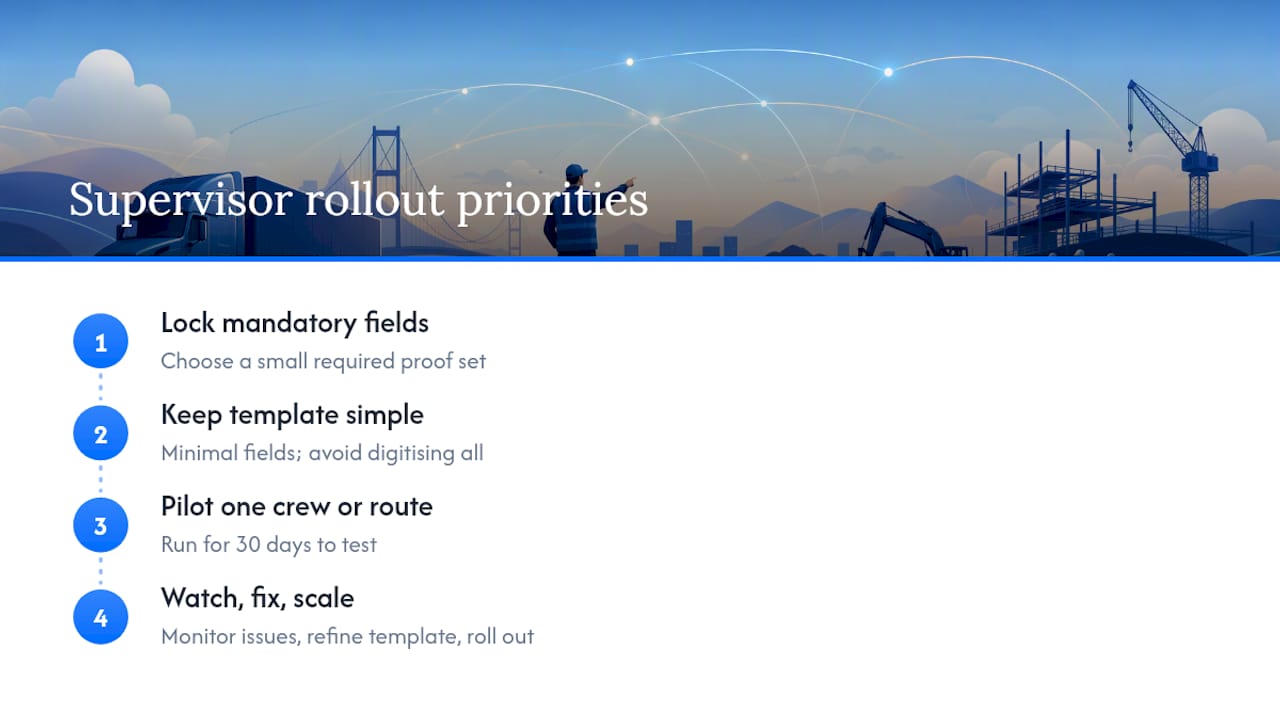
Most rollouts fail because someone tries to digitise everything at once. The fix is simpler than it sounds: lock in a small set of mandatory proof fields, keep the template dead simple, and prove the model on one crew before asking the whole fleet to change habits.
Pilot one route or one crew for 30 days. Watch what breaks, fix the template, then scale. That’s the whole playbook.
— Mike
See how Dirtchamp handles dockets on site
Dirtchamp is built for exactly the workflow this article describes: digital pre-starts and dockets that capture time, GPS, load details and signatures the moment work happens, not hours later from memory. GPS tracking runs through the OBD port with no complicated install, so fleet and site managers get live vehicle visibility without an IT project. Approved dockets flow straight through to billing exports and job costing, cutting the manual re-entry that slows most offices down.
If your crews are still relying on paper docket books or a mix of spreadsheets and photos on someone’s phone, the fastest way to see the difference is to try it on one route or one crew. Request a demo of Dirtchamp’s truck and civil software and pilot digital dockets on your highest-dispute job category first.
Sources
- Paper dockets vs digital dockets in construction: what is right for your business?
- Electronic ticketing systems for hauling operations: Digital load tracking guide 2026 | DirtMatch Blog
- T&M Billing Guide for Construction Contractors | SmartBarrel
- Job docket definition (Law Insider)