Weekly Supervisor Plan for Construction Rosters Stopping Double Booking

The simplest effective construction roster is a live staffing matrix plus weekly reviews, enforced certification rules and a connected time-capture workflow. This keeps every site staffed with the right skills, avoids double-booking across projects, and cuts emergency hires. It works because it ties directly to Fair Work obligations and Safe Work Australia fatigue guidance rather than running as a separate paperwork exercise, and Dirt Champ is built around exactly this loop.
TL;DR:
- A live staffing matrix should be updated weekly and include certifications, roles, and availability to prevent double-booking and ensure compliance with award rules.
- Centralizing worker profiles and establishing clear rules for availability, travel buffers, and critical roles reduces conflicts across multiple sites and simplifies contingency planning.
- Use a connected rostering system with automation features like expiry alerts, real-time updates, and GPS tracking to improve accuracy and visibility on site activity.
- Regular weekly reviews focused on shift fill rates, double-bookings, and overtime hours help identify issues early and keep staffing aligned with project needs.
- Piloting platforms like Dirt Champ over one or two sites can quickly demonstrate benefits such as real-time data, cert alerts, and streamlined reconciliation, optimizing overall roster management.
Table of Contents
- A practical roster planning checklist for this week
- How do you stop double-booking across multiple sites?
- What are the rostering rules for construction in Australia?
- What capabilities should a construction rostering tool have?
- How often should you review a construction roster?
- Which KPIs prove a roster is working?
- How Dirt Champ supports this roster plan
- Training and upskilling scheduling within roster plans
- Communication strategies for roster changes and staff notifications
- Contingency planning for unexpected absences or site delays
- One-week supervisor plan: put the checklist to work
- Try Dirt Champ: a low-risk pilot for your next roster cycle
- Sources
- FAQ
A practical roster planning checklist for this week
Roster planning construction crews well comes down to five habits, repeated every week rather than done once at project kickoff.
- Build a weekly staffing matrix. Show role, person, site and date on one page so gaps are visible at a glance.
- Mark certifications and expiry dates. Assign named workers to roles only where their tickets, licences or inductions are current.
- Apply hard rules before you assign. Minimum certified coverage per shift, minimum rest between shifts, and travel buffers between sites all need to be locked in, with critical-path shifts confirmed first.
- Confirm availability, then publish. Set a clear cut-off time for last-minute swap requests so the roster doesn’t unravel the night before a pour.
- Log every exception. A no-show, a late swap or a cert lapse should trigger a corrective staffing action, not just a shrug and a phone call.
Pro Tip: Run the matrix as a live document, not a Monday morning printout. A roster that only exists on paper is out of date by Wednesday.
How do you stop double-booking across multiple sites?
Multi-site work is where most rosters fall apart, because the same electrician looks “available” on two site supervisors’ spreadsheets at once. The fix starts with a single source of truth for every worker’s availability, not five versions living in five phones.
- Keep one staff profile per person, visible to every site, so nobody double-books a crane operator who’s already locked in elsewhere.
- Build travel-time buffers into adjacent-site shifts. A 20-minute drive between two sites means the second shift can’t start where the first one ends.
- Protect critical-path roles. Foremen, crane operators and certified riggers should have their split allocations capped, because losing them mid-shift stalls the whole crew behind them.
- Set a simple rule for tentative versus confirmed bookings, with a clear publish cut-off, so two project managers aren’t both holding the same carpenter as “pencilled in.”
- Know your lead times for bench staff, subcontractors and temp labour before you need them, not after a no-show.
Pro Tip: Give every project manager visibility of the same roster, not just their own site’s slice. Most double-bookings happen because two PMs are working from different truths.
Aligning labour allocation to the actual project schedule, rather than treating the roster as a standalone spreadsheet, is standard resource planning practice, and it’s the difference between a roster that reacts to problems and one that prevents them.
What are the rostering rules for construction in Australia?
Award interpretation and pay rules sit with Fair Work, and the Building and Construction General On-site Award is where you check specific penalty rates and overtime triggers rather than guessing from memory. Roster elements that commonly trigger extra pay include:
- Overtime thresholds once daily or weekly hours caps are exceeded.
- Penalty rates for weekend, public holiday or early/late shift work.
- Span-of-hours breaches, where a shift starts or finishes outside the ordinary hours window set by the award.
- Broken shifts or split shifts that don’t meet minimum engagement rules.
Safe Work Australia sets out fatigue hazard controls that roster planners should build into shift patterns, and where driving or heavy vehicle work is involved, NHVR fatigue management rules can add mandatory rest requirements on top of general workplace fatigue guidance. Practical controls worth building into your process: automated cert expiry alerts, rule-blocking when a shift save would breach minimum rest, and a hard stop on assigning anyone without current competency records from Vertical Construction Loan Best Practices for Developers | CR Equity AI.
Award rates aren’t estimates. Use the Fair Work pay calculator for exact overtime and penalty figures rather than applying a rule of thumb across a whole crew. Complex enterprise agreement or multi-award questions are where payroll or HR specialists, or an employment lawyer, earn their fee.
What capabilities should a construction rostering tool have?
A spreadsheet is fine for a single small site with a stable crew. Once you’re running multiple sites, subcontractors and rotating trades, the risk of manual error outweighs the low cost of a spreadsheet. At that point, look for a connected system with these capability categories:
- A single staff profile per worker, visible across every active site.
- Multi-site scheduling view, so clashes show up before they happen, not after.
- Certification tracking with automatic expiry alerts.
- Geo and time stamping on shift starts and finishes, so the roster matches reality.
- A rules engine that blocks a shift save if it breaches minimum rest, cert coverage or span-of-hours limits.
- Payroll integration, so approved hours flow through without manual re-entry.
Mobile field capture matters as much as the rostering screen itself. If pre-starts, dockets and on-site time entries aren’t captured where the work happens, the roster becomes a plan that nobody checks against what actually occurred. Automation features worth prioritising include availability windows, auto-notifications when a shift is published or changed, and a structured swap workflow instead of a group text chain. Before signing anything, check how the tool handles data ownership across payroll, job costing and asset tracking integrations, because locked-in data is a bigger headache than a clunky screen.
How often should you review a construction roster?
Treat the roster as a living document, not a set-and-forget schedule. A useful rollout looks like this:
- Baseline first. Capture current staffing, certs and known gaps before changing anything.
- Pilot on one or two projects. Prove the process works before rolling it across every site.
- Train supervisors on the weekly cycle. The matrix only works if the people filling it in trust it.
- Scale once the pilot holds up. Add sites once the cadence is running smoothly, not before.
Run a weekly review meeting with a fixed agenda: plan versus actual hours, flagged certifications, any double-bookings from the past week, and budget variance against labour cost. Weekly is the right rhythm for active construction work; monthly is too slow to catch a cert lapse or a clash before it costs a day on site. Assign clear ownership too: one person publishes the roster, one approves swaps, and one reconciles timesheets against it.
Pro Tip: Treat the staffing matrix as an early-warning system, not a record-keeping chore. A gap that shows up on Monday’s matrix is a phone call. The same gap discovered Thursday morning is a delay.
Which KPIs prove a roster is working?
Finance and operations both want proof, not a feeling that things have improved. Track:
- Shift fill rate, sourced from your roster against actual timesheet clock-ins.
- Double-booking incidents, counted per fortnight across all active sites.
- Overtime hours as a percentage of total hours, pulled from payroll.
- Certified-role coverage, tracked against cert expiry records.
- Labour variance against budget, cross-checked with site diaries.
A rough savings estimate comes from combining reduced emergency hire costs, lower overtime spend, and fewer rework hours caused by understaffing or wrong-skill assignments. Report shift fill rate and double-bookings weekly to operations, and report labour variance and overtime percentage monthly to finance, since that’s the cadence each team actually acts on.
How Dirt Champ supports this roster plan
Dirt Champ was built around the same loop this checklist describes. Rostering and timesheets sit next to digital pre-starts and dockets, so the roster and the actual hours worked come from the same record, not two systems that drift apart. Live GPS tracking through the OBD port gives supervisors real-time visibility of where crews and machinery actually are, without a separate installation job. Real-time project records mean a cert alert or a site clash shows up before it becomes a delay.
A quick pilot typically surfaces value fast: cert expiry alerts catch a lapsed ticket before it hits the roster, live site visibility replaces the group-text guesswork, and timesheet reconciliation drops from a end-of-week scramble to a same-day check.
Training and upskilling scheduling within roster plans
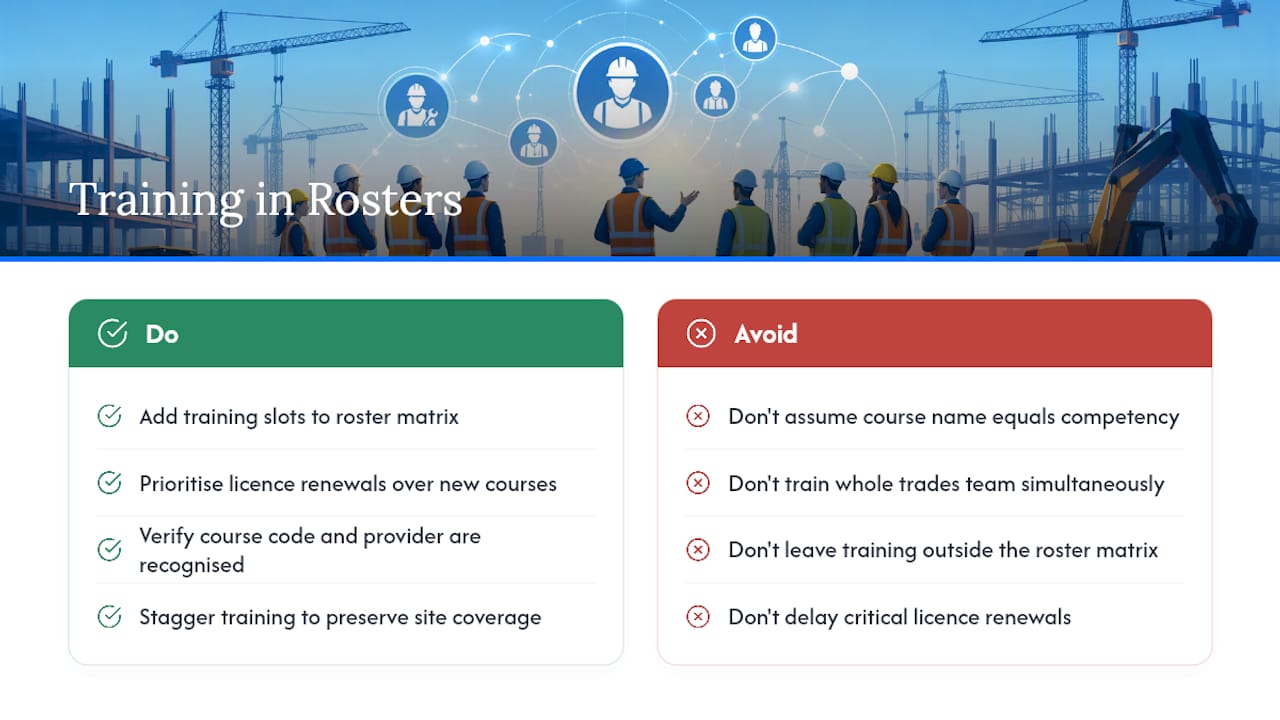
A roster that never accounts for training eventually runs out of people qualified for the work in front of it. Build training slots into the matrix the same way you build shifts: named person, date, site (or training provider), and the qualification being gained or renewed.
Prioritise renewals before new training. A crew losing its only rigger to an expired high-risk licence is a bigger risk than a junior carpenter waiting an extra fortnight for a new ticket. Cross-check planned courses against Training to confirm the qualification code and provider are nationally recognised, rather than assuming a course name matches the competency you actually need on site.
Stagger training across the crew rather than sending your whole trades team to the same course in the same week. A staffing matrix that shows three qualified scaffolders on a Tuesday and one on Wednesday, because two are off-site training, is doing its job by flagging the gap early. Build a small buffer of dual-skilled workers where you can. A carpenter with a current forklift ticket, for example, gives you flexibility the roster can lean on when someone else is unavailable.
Treat upskilling as roster maintenance, not a side project run by HR alone. Supervisors who own the training calendar inside the same matrix they use for daily staffing catch clashes between “who’s rostered” and “who’s actually available that week” far earlier than a separate training spreadsheet ever will.
Communication strategies for roster changes and staff notifications
Rosters change. The difference between a well-run site and a chaotic one is how fast that change reaches the right people, in a form they’ll actually see before their shift starts.
Set one channel as the source of truth for roster publication and changes, whether that’s a rostering app notification, a site noticeboard photo, or a group message thread, and stop using whichever channel is convenient in the moment. Mixing channels is how a swap gets approved by text but never makes it into the actual roster.
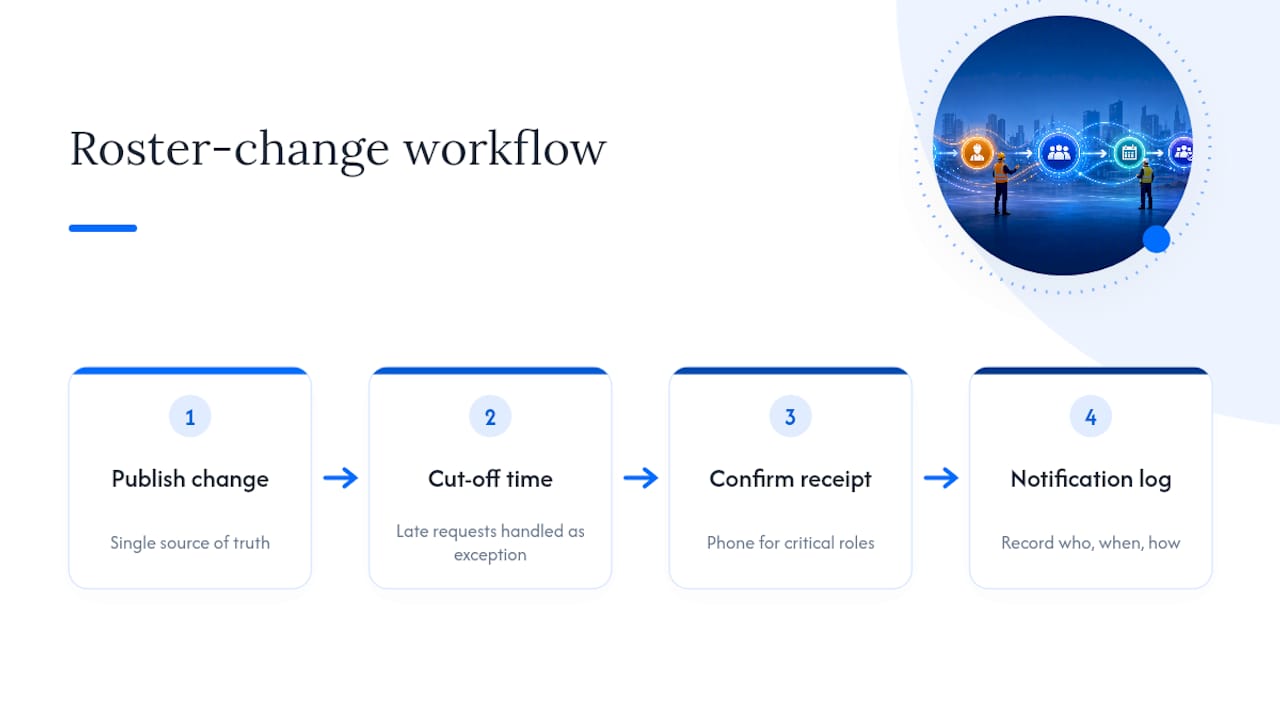
Give every change a clear cut-off time. A swap requested after the cut-off gets handled as an exception, with a named person confirming it, rather than a quiet edit nobody else sees. Publish changes with enough lead time that workers can plan around them, particularly for early starts or interstate travel between sites.
Confirm receipt, don’t assume it. A notification sent isn’t the same as a shift confirmed. Where a roster change affects a critical-path role, a phone call or a direct reply beats a broadcast message every time. Keep a simple log of who was notified, when and how, because that record is what saves an argument over a missed shift or a disputed no-show.
Contingency planning for unexpected absences or site delays
Every roster needs a plan for the day it doesn’t survive contact with reality. A worker calls in sick, a site gets rained out, a supplier delay pushes a pour by two days. The roster that only works when everything goes to plan isn’t a plan at all.
Keep a bench of pre-vetted casual, subcontractor or agency labour with known lead times, so an absence doesn’t turn into a scramble. Know in advance which roles are hardest to backfill (specialist trades, ticketed operators) and have a shortlist ready before you need it, not after.
Build in a small buffer of cross-skilled workers who can cover more than one role, because a single flexible worker often solves a gap faster than sourcing a specialist replacement. When a site delay pushes work sideways, reassess the matrix immediately rather than leaving crews idle on a site that’s stalled, and redeploy them to a project that’s ready to absorb extra hands.
Document every contingency action taken, even a same-day reshuffle because that record feeds next week’s staffing matrix and shows patterns, like a site that always runs short on Mondays, that a one-off fix would otherwise hide.
One-week supervisor plan: put the checklist to work
Build the staffing matrix on Monday. Publish a tentative roster Tuesday, confirming critical roles first. Lock swaps by a set Wednesday cut-off. Reconcile timesheets against the matrix Thursday. Review fill rate, double-bookings and overtime hours Friday.
Common pitfalls: skipping the cut-off, letting cert checks slide, and treating the matrix as a one-off document instead of a weekly habit. Track shift fill rate, double-booking incidents and overtime hours percentage through the pilot.
— Mike
Try Dirt Champ: a low-risk pilot for your next roster cycle
Dirt Champ is the practical alternative to running rostering, timesheets and site records across three disconnected spreadsheets. Instead of chasing paper dockets and manually cross-checking who’s certified for what, you get one connected view of crews, certs and site activity, updated as work happens rather than reconstructed at week’s end.
A sensible way to test it: pick one or two active sites, run a four-week trial, and track the KPIs already covered here, fill rate, double-bookings, overtime hours and certified coverage. Across that pilot, expect live site records instead of end-of-day guesswork, automatic cert alerts instead of a spreadsheet nobody remembers to update, and a direct link between the roster and the timesheet so reconciliation stops being a Friday afternoon headache. If that sounds like the gap in your current process, take a look at the Dirt Champ platform and start scoping your pilot sites this week.
Sources
FAQ
What is roster planning?
Roster planning is the process of matching available, certified workers to shifts across sites and dates, while enforcing rules like minimum rest, cert coverage and award-compliant hours. Done well, it’s a live staffing matrix reviewed weekly, not a static schedule set once at project start.
How does a 7 day roster work?
A seven-day roster covers every day of the week, including weekend and public holiday shifts, and must apply the correct penalty rates and span-of-hours rules from the relevant award for each day worked. It needs the same certification checks and minimum rest rules as a standard weekday roster.
What is the best scheduling software for construction?
The right tool depends on your site count and crew complexity, but look for a single staff profile, multi-site visibility, certification tracking, mobile time capture and payroll integration as baseline requirements. Some rostering tools cover this range by connecting rostering and timesheets to live site records and GPS tracking in one platform.