Mobile First Rollout Reduces Construction Paperwork for Supervisors

The fastest way to reduce construction paperwork is to remove low-value forms, switch to capture-once mobile workflows, and centralise everything in a common data environment with automated RFI and submittal routing. Businesses that automate high-volume approvals cut RFI response time from 8.2 business days to about 2.6 days, and mobile daily reports drop from roughly 25 minutes to 8. Platforms like Dirt Champ already build these capabilities into one system.
TL;DR:
- Automating high-volume approvals can cut RFI response times from over eight days to fewer than three, and daily reports from twenty-five to eight minutes.
- Conducting a forms audit and simplifying or eliminating unused forms can significantly reduce duplicate data and outdated paperwork across projects.
- Moving daily and safety reports to mobile entry with offline sync and standardizing templates ensures more accurate, timely, and searchable field data.
- Implementing a common data environment and automated routing for RFIs and change orders prevents bottlenecks and shortens cycle times.
- Focusing on the two highest-volume forms first, typically daily reports and timesheets, delivers early wins that build momentum for full digital transformation.
Table of Contents
- How do you actually reduce construction paperwork?
- What tools and systems actually cut paperwork?
- What does a 30 to 90-day rollout look like?
- How do you know the rollout is working?
- How does this map to a real truck and civil workflow?
- Why most paperwork reduction plans stall before they start
- How Dirt Champ helps you get there faster
- Sources
How do you actually reduce construction paperwork?
Most sites don’t have a paperwork problem. They have a “we’ve always done it this way” problem. Somewhere along the line, someone added a form for a one-off issue, and it never left the folder. Ten years later, crews are filling out triplicate carbon paper for jobs that a phone could log in ninety seconds.
Six moves get you out of that hole. None require a technology overhaul on day one, and you can start most of them this week.
1. Run a forms audit before you buy anything. Pull every form your business currently uses. Timesheets, dockets, pre-starts, incident reports, permits, delivery tickets. For each one, ask who actually reads it and what decision it drives. If nobody can answer that in ten seconds, cut it or fold it into another form. Many businesses find that a substantial portion of their paper stock is duplicated data, dead process, or outdated forms.
2. Move daily reports and safety forms to mobile, same-day entry. A form filled out at 4:30 pm on-site is more accurate than one reconstructed from memory back at the depot on Friday. Mobile daily reports built for field speed with minimal fields, dropdowns, and autofill wherever possible are what make the 68% time reduction on daily reporting achievable. The habit matters more than the app: log it while it’s happening, not when someone chases you for it.
3. Capture once, use everywhere. If a supervisor enters hours on a timesheet and payroll re-keys them into another system, that’s duplicate entry, and duplicate entry is where errors creep in. The same goes for materials quantities and site photos. Capture the data point once, at the source, and let every downstream report, invoice, or compliance record pull from that same entry.
4. Standardise templates and mandatory fields. Two supervisors filling out the “same” form differently is a governance failure, not a personality quirk. Lock down naming conventions, required fields, and metadata tags (job number, date, location, crew) so nothing gets lost in a search later. This is where structured data standards such as the ISO 19650 series earn their keep. Boring, yes. But boring is what makes a document findable in twelve seconds instead of twelve minutes.
5. Automate RFI, submittal and change order routing. Manual RFI handling is one of the biggest silent time sinks on any job. Submittals often carry the longest cycle times of any document type on a project, because they sit in someone’s inbox waiting for a signature that never seems to be urgent enough. Automated routing with deadline reminders tied to contract service levels closes that gap fast, and it’s the single change most likely to shorten your overall program.
6. Enforce “latest-only” on drawings. Superseded prints circulating on-site cause more rework than almost any other paperwork failure. Pull old revisions physically, lock digital access to the current version, and make it a non-negotiable site rule that nobody works from a print that isn’t stamped current.
Pro Tip: Don’t try to digitise everything in one hit. Pick the two highest-volume paper forms on your site right now, usually daily reports and timesheets, and get those running clean before you touch anything else. Momentum beats ambition here.
What tools and systems actually cut paperwork?
Picking the right architecture matters more than picking the flashiest app. A common data environment, or CDE, is the backbone: a single, controlled location where every document lives with version history intact, so nobody is ever working from an outdated file by accident. Effective document management depends on information being accurate, connected, and accessible across the whole project, not siloed in someone’s inbox or a folder on a laptop that gets replaced every two years.
On top of the CDE, a workflow or routing layer handles the RFIs, submittals, and change orders, tracking deadlines and flagging anything that’s about to breach a service level. Without that layer, you’ve digitised the paper but kept the bottleneck.
When you’re assessing tools, insist on the following:
- Offline sync that actually works. Sites with patchy signal need forms that save locally and upload the moment coverage returns, not a spinning wheel that loses an hour’s data.
- Templated fields with dropdowns and autofill. Free-text forms invite inconsistency; structured fields keep data clean and searchable.
- Photo capture with automatic geotags and timestamps. This turns a dispute over site conditions into a five-second lookup instead of a week of arguing.
- Payroll, accounting, and scheduling integrations. If hours captured on-site don’t flow straight into payroll, someone is still re-keying them, and you haven’t actually removed the paperwork, just moved it.
- Fast, reliable search by job number, date, or crew. A document management system nobody can search is just a paper filing cabinet with a login screen.
Smaller businesses tend to lag here. Common paper holdouts include delivery tickets, handwritten timesheets, and change orders, largely because those forms feel too fiddly to digitise until someone actually tries. They usually aren’t.
What does a 30 to 90-day rollout look like?
Trying to digitise everything simultaneously is how paperless projects stall out in month two. A staged approach gets you real wins before asking crews to change everything they know.
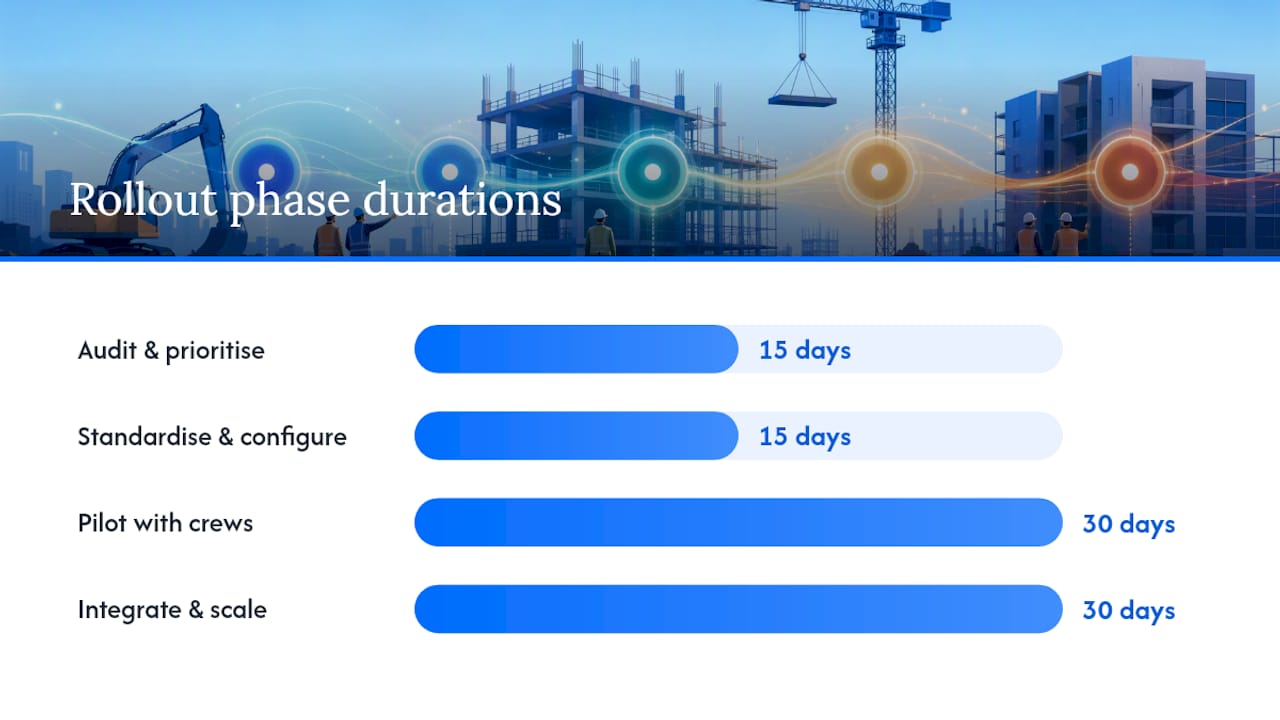
- Days 1 to 15, audit and prioritise. Identify your highest-volume paper documents, typically daily reports and timesheets, and confirm those as the first digitisation targets.
- Days 15 to 30, standardise and configure. Lock in templates, mandatory fields, and metadata rules. Set up mobile forms with offline sync so field crews aren’t blocked by dead zones.
- Days 30 to 60, pilot with one or two crews. Run it live, measure adoption daily, and fix friction points fast. Recruit a champion on each crew, someone who’s naturally quick with a phone and can talk their crew through it without office intervention.
- Days 60 to 90, integrate and scale. Connect the mobile data to payroll and accounting, roll out to remaining crews, and enforce the “rules of the road”: no paper backups, no shadow spreadsheets, no exceptions without sign-off.
A phased 30-day approach targeting the five highest-volume document types tends to produce measurable wins fast enough to keep leadership backing the rollout past the pilot stage.
Run an adoption dashboard from day one, even a simple spreadsheet tracking who’s submitting digitally versus who’s still on paper. Keep mandatory fields to the bare minimum during the pilot; you can tighten requirements once habits form. Build a sandbox environment where crews can practise on dummy jobs before going live on real ones, and run a short training session, twenty minutes is usually enough, rather than expecting people to self-teach on a live site.
How do you know the rollout is working?
Track five numbers, baseline them before you start, and revisit them monthly.
- RFI cycle time. Automated routing has taken this from roughly 8.2 business days down to 2.6 in documented rollouts. That’s the number to chase.
- Daily report completion time. Expect a drop from around 25 minutes to about 8 once mobile capture beds in.
- Document retrieval time. Fragmented paper records mean crews waste hours hunting for the right version; centralised, searchable archives cut that time sharply.
- Rework rate. Fewer superseded drawings and duplicate entries should show up directly in fewer rework hours billed.
- Field app adoption rate. The percentage of crews submitting digitally versus still handing in paper is the single clearest sign the rollout is landing.
Set a 3-month target of full adoption on your two priority forms, and a 12-month target of RFI and submittal cycle times matching industry benchmarks. Review the dashboard monthly, not quarterly. Momentum stalls fast if nobody’s watching the numbers.
How does this map to a real truck and civil workflow?
The steps above sound reasonable on a whiteboard. What they actually look like on a live site is a driver finishing a pre-start in under two minutes instead of filling out a paper checklist that gets handed in three days late, if it’s handed in at all.

Dirt Champ was built specifically for that gap. Digital pre-starts and dockets replace the paper versions crews already hate filling out, real-time site records give the office visibility the moment something happens on-site, and GPS tracking through the OBD port means location data appears automatically, no separate hardware install, no extra device for drivers to manage. Compliance and safety records get generated from the same data crews are already entering, instead of a second, separate paperwork trail.
Mapped against the rollout phases: the audit phase is where you’d identify which paper forms Dirt Champ’s pre-starts and dockets replace outright. The pilot phase is where GPS and real-time records prove their value to sceptical crews fastest, because supervisors see the payoff in the office within days. The scale phase is where automated compliance reporting and rostering integrations remove the last of the manual re-entry.
The businesses that get the most out of going digital aren’t the ones with the fanciest tech. They’re the ones that pick the two forms causing the most pain, fix those first, and let the wins do the convincing.
Pro Tip: Ask any driver which paper form they’d delete first if they could. That answer is usually your best starting point, not whatever the office thinks is most urgent.
Why most paperwork reduction plans stall before they start
The advice you’ll hear most often is “go digital, go paperless, buy software.” That advice isn’t wrong, but it skips the part that actually determines whether the rollout survives past month one: sequencing.
Most failed attempts at digital construction records fail because someone tried to digitise everything at once, forced every crew onto a new system on the same Monday, and burned all their goodwill in a single bad week. The businesses that succeed pick one or two painful, high-volume forms, fix those properly, and let the early win build appetite for the next stage. That’s not a compromise. It’s the only sequencing that respects how busy crews actually adopt new habits.
The other thing conventional advice underplays is the office side. Reducing paperwork isn’t just about giving field crews an app. It’s about the office trusting the data enough to stop asking for a paper backup “just in case.” Until that trust is built, you haven’t reduced paperwork, you’ve just duplicated it into two formats. Prioritise real-time visibility for supervisors and admin teams early, because that’s what actually retires the paper trail for good.
— Mike
How Dirt Champ helps you get there faster
The core problem this whole rollout solves is simple: too much time lost to paper forms, duplicate entry, and chasing down the right version of a document. Dirt Champ was built to close that gap for truck and civil businesses specifically, connecting trucks, machinery, project records, and compliance into one platform instead of scattering them across paper dockets, spreadsheets, and separate compliance folders.
Where a general-purpose document app makes you configure workflows from scratch, Dirt Champ arrives already shaped around the pre-starts, dockets, and site records that truck and civil crews fill out every single day. GPS tracking through the OBD port means supervisors get live vehicle visibility without extra hardware installs or IT overhead. If you’re ready to see how it maps to your own fleet and site operations, visit the Dirt Champ platform and request a demo to see your first paperwork win inside a week.
Sources
- Ditch Paper: Construction project documentation automation — how to (2026)
- Construction document management best practices
- Digital jobsite: why contractors are going paperless
- Curtin University research on construction information management
- ISO standard: Information management for the built environment — Overview (ISO 19650 series reference)