Deploy No Install GPS in Weeks for Truck and Civil Fleets

Yes, fleets can get dependable GPS visibility without hardwired installs, using plug-and-play OBD devices, battery or magnetic asset trackers, or a hybrid mix of both. The right choice depends on asset type, tamper risk, whether you need engine diagnostics, and how fast you need to roll out. Specialised fleet software can integrate plug-and-play GPS into one operations platform, so you get location data without a complicated install project.
TL;DR:
- No-install GPS devices, such as OBD plug-ins, magnetic trackers, and hybrid adapters, offer quick deployment but are less tamper-resistant than hardwired systems.
- Battery and magnetic trackers are suitable for trailers and equipment without OBD ports, but require regular charging or replacement depending on reporting frequency.
- Proper asset classification, staged rollout, and verification testing are essential to ensure a successful, consistent fleet-wide GPS tracking implementation.
- Integration of multiple device types into a single fleet management platform prevents visibility gaps and streamlines operations and billing processes.
- High-value, tamper-prone assets may still require hardwiring or hybrid setups with tamper alerts to maintain security and reliable tracking.
Table of Contents
- How no-install GPS tracking actually works
- Matching the right method to each asset class
- Rolling out plug-and-play trackers without stalling
- Where no-install tracking goes wrong, and how to fix it
- Scaling a rollout across yards without losing devices or time
- Legal considerations for tracking without hardwired installs
- Device size, battery life and maintenance across the options
- Where no-install tracking makes the most sense
- Placement tips that actually improve tracking reliability
- Why an integrated platform beats a pile of separate trackers
- Get GPS visibility without the install headache
- Sources
How no-install GPS tracking actually works
“No installation” doesn’t mean no device. It means no wiring harness, no dashboard removal, and no technician spending an hour under the steering column. Three approaches cover almost every truck and civil fleet scenario.
OBD/OBD-II plug-in trackers slot straight into the diagnostic port most light and medium vehicles have had since the late 1990s. Installation is very fast, and where the vehicle supports it, you get engine diagnostics alongside location data. The trade-off is exposure: because the device just plugs in, a driver (or a thief) can unplug it just as fast, according to Spytec’s comparison of OBD and hardwired trackers.
Battery-powered and magnetic asset trackers solve a different problem: trailers, generators, water pumps, site sheds and other non-powered plant that have no OBD port to plug into at all. These attach with a magnet or bolt-on mount in minutes, run on internal batteries for weeks or months, and report position on a schedule you set. That schedule is the real design decision. Report every five minutes and you get near real-time location at the cost of battery life; stretch it to hourly pings and a unit can run far longer between charges, as outlined in OneStepGPS’s guide to construction fleet software.
Hybrid plug-and-play setups use adapter cables and splitters to extend OBD-style tracking to equipment that wasn’t originally designed for it. These stretch the reach of no-install tracking, but they usually can’t reach the same depth of CAN-bus data a genuine hardwired install can pull from an engine control unit.
Every no-install method shares one limitation: none of them match a hardwired unit for tamper resistance, and telemetry depth varies a lot depending on what the asset’s diagnostic port actually exposes.
- OBD plug-in: fastest deploy, diagnostics on compatible vehicles, easiest to unplug
- Battery/magnetic: works on anything, no port needed, battery life trades off against ping frequency
- Hybrid adapters: extends reach to more equipment, limited engine data access
- Common weak point across all three: less tamper resistance than a wired install
Matching the right method to each asset class
Not every truck, trailer or excavator needs the same tracking approach, and treating them all the same is where most fleets waste money or end up with gaps in coverage. Use asset type and risk profile as your starting filter.
- Light and medium vehicles with an accessible OBD port are the easiest call. A plug-and-play unit gets you location and diagnostics with almost zero labour, which makes it the default for utes, service vehicles and most trucks under warranty.
- Trailers, generators and other non-powered assets need a battery or magnetic tracker, because there’s no ignition and no OBD port to draw power or data from. This is also where most theft and “where did that trailer end up” problems occur on civil sites.
- High-value or high-tamper-risk assets (specialised attachments, machinery that regularly leaves site overnight, anything with a history of interference) deserve a hardwired install or at minimum a hybrid setup with tamper alerts switched on, per FleetMate’s hardwiring versus OBD2 guide.
- Anything still under manufacturer warranty should avoid drilling or splicing wherever possible; plug-and-play and magnetic mounts protect that warranty position while giving you visibility.
Vibration and environmental exposure matter too. A magnetic tracker rated for light-duty use on a ute will fail faster bolted to an excavator that shakes all day on a compaction job. Weigh the labour saved against how long you actually need that device to survive in the field before you commit to a fleet-wide standard.
Rolling out plug-and-play trackers without stalling
A no-install rollout still needs a process, or you’ll end up with half your fleet reporting and the other half sitting in a drawer.
Start with an asset audit. Walk the yard and classify every vehicle and piece of plant into one of three buckets: has an OBD port, needs a battery/magnetic tracker, or is a candidate for hardwiring. This single step prevents the most common rollout failure, which is ordering the wrong device type for half your fleet.
Next comes procurement and setup. Activate SIM or cellular plans before devices leave the office, label each unit with the asset it’s assigned to, and keep a simple spreadsheet or your fleet software matching serial numbers to assets from day one.
On-site installation is genuinely quick for both device types:
- Plug OBD units into the diagnostic port, usually under the dash near the steering column
- Mount magnetic trackers on a flat, metal, weather-protected surface away from the exhaust and any high-heat components
- Secure cabled units with zip ties so vibration doesn’t work them loose
- Keep a basic toolkit and gloves on hand even though most installs need no tools at all
Verification is the step teams skip and regret. Check the device’s LED status, open the tracking app to confirm a live position, and run a short test drive to validate movement, speed and ignition events, a process FleetMate recommends for exactly this reason.
Pro Tip: Do the test drive before the truck leaves the yard for its next job, not after. Catching a dead unit on-site costs you five minutes; catching it three days into a job costs you a blind spot in your records.
Where no-install tracking goes wrong, and how to fix it
The failure modes here are predictable, and every one of them has a known fix.
Unplugged devices are the biggest gap in plug-and-play coverage. A driver disconnects an OBD unit, deliberately or by accident, and your reporting goes dark with no warning. Devices with tamper and unplug alerts flag this immediately, and units with internal battery backup keep reporting for hours after power is cut, which OneStepGPS notes as a standard mitigation for construction fleets.
Compatibility surprises show up when you buy in bulk without testing first. OBD pinouts vary across makes and even model years, so a device that works perfectly on one truck can fail silently on another. Test on a handful of representative assets across your fleet before ordering fifty units.
Shallow telemetry is a structural limit, not a fault. Plug-and-play devices simply won’t expose the same depth of CAN-bus data a hardwired install reaches, so plan your alerts and reports around what the device can actually see rather than assuming parity with a wired setup.
- Enable tamper/unplug alerts on every plug-and-play device from day one
- Choose units with internal battery backup for assets that travel unattended
- Pilot new device models on 3 to 5 assets before a full order
- Reach for professional installation on security-sensitive or vibration-heavy machinery, even if that breaks your no-install rule for that one asset
Scaling a rollout across yards without losing devices or time
Coverage across ten trucks is easy. Coverage across 200 assets spread over multiple sites is a project, and it needs project discipline.
- Track every device from shipment to installed asset. Log serial numbers against asset IDs the moment units arrive, before they ever reach a yard, so nothing goes missing between the office and the truck.
- Stage installations in windows rather than a single blitz. Rolling out fifty units in one week overwhelms your team and creates a maintenance backlog when something goes wrong on day two.
- Use provider-led installation where your internal capacity is thin. Self-install projects in construction fleets often show inconsistent results, with devices going missing and installs varying wildly in quality when handled ad hoc, according to Build Construct’s analysis of self-install telematics failures. A professional installer’s standardised process gets you to full coverage faster.
- Set KPIs before you start, not after. Track the percentage of assets reporting within a set number of days of rollout, your tamper incident rate, and the share of assets with verified location pings in the past 24 hours.
Those KPIs tell you whether the rollout actually worked, rather than just whether the devices got handed out.
Legal considerations for tracking without hardwired installs
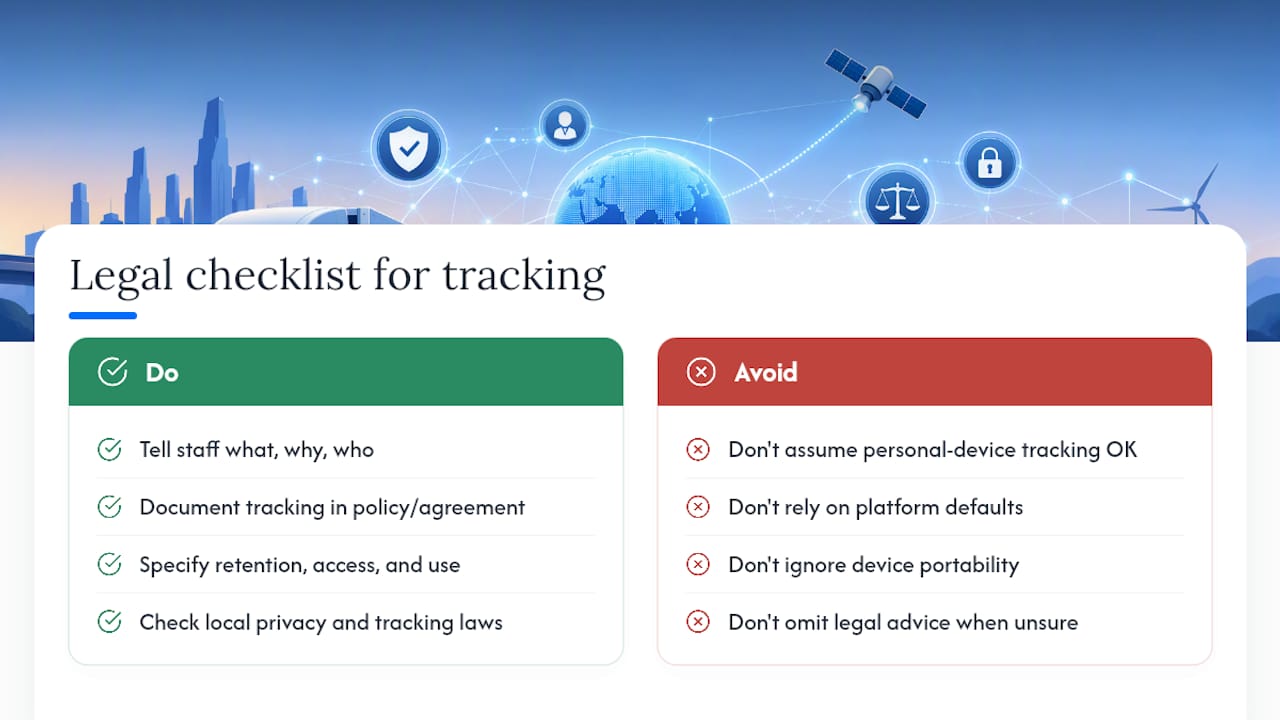
GPS tracking on business-owned vehicles and equipment is broadly permitted, but the rules tighten around who’s driving and what you tell them. If a vehicle or asset belongs to the business, employers generally have the right to track it for operational and safety purposes. That right gets murkier the moment a personal device, or a personally-owned vehicle used for work, enters the picture.
Transparency is the practical safeguard regardless of the legal minimum in your jurisdiction. Tell staff what’s being tracked, why, and who can see the data, ideally in writing as part of an employment agreement or fleet policy. This matters more with no-install devices specifically, because their portability means they sometimes get moved between vehicles or lent to other teams, which can blur who’s actually being tracked at any given time.
Data retention deserves its own line in that policy. Location history is personal information once it can be tied to an individual driver, and how long you keep it, who can access it, and what it gets used for should be spelled out rather than left to whatever your tracking platform defaults to.
If your fleet crosses state or territory lines, check whether tracking and privacy obligations differ locally, since Australian privacy obligations aren’t always uniform across jurisdictions. When in doubt on anything beyond general workplace tracking, get advice specific to your situation rather than relying on a generic guide.
Device size, battery life and maintenance across the options
The physical trade-offs between no-install device types are straightforward once you line them up side by side.
| Device type | Typical size | Battery life | Maintenance need |
|---|---|---|---|
| OBD plug-in | Small, palm-sized, sits in the port | Powered by the vehicle, no charging | Check connection after servicing, since mechanics sometimes unplug and forget to reconnect |
| Battery/magnetic tracker | Compact, puck or brick-shaped | Weeks to months depending on ping frequency | Periodic recharge or battery swap; check mount hasn’t shifted |
| Hybrid/adapter cable | Similar to OBD unit plus a cable run | Vehicle-powered | Inspect cable and connector for wear, especially on equipment with heavy vibration |
The pattern is consistent: anything vehicle-powered needs almost no maintenance beyond checking the connection, while anything battery-powered needs a recharge or swap schedule built into your routine. Set that schedule around your reporting frequency. A tracker pinging every five minutes on a busy trailer will need attention far sooner than one set to hourly updates on equipment that rarely leaves the yard.
Where no-install tracking makes the most sense
No-install methods aren’t a compromise for every situation, they’re the better option for a specific set of use cases.
Rental and short-term hire fleets benefit enormously, because you’re not drilling into equipment you don’t own long-term, and a plug-and-play unit moves with the asset when the hire ends. Trailers and non-powered plant are close to a mandatory case, since there’s no engine to hardwire into in the first place. Fast-scaling fleets that need visibility across dozens of new vehicles in weeks rather than months lean on OBD and battery trackers because installers simply can’t hardwire that many units fast enough.
Seasonal or project-based equipment that gets deployed for a job and then sold or returned also suits no-install tracking, since you avoid sinking installation cost into an asset you won’t hold long-term. And vehicles still under manufacturer warranty are a straightforward case for plug-and-play, since it sidesteps the wiring modifications some warranty terms flag as a concern.
Where no-install tracking struggles is high-value, high-tamper-risk assets that live on remote sites unattended overnight. That’s still the case for hardwiring or, at minimum, a hybrid setup with tamper alerts running.
Placement tips that actually improve tracking reliability
Where you put a no-install tracker affects both signal quality and how long it survives on the asset.
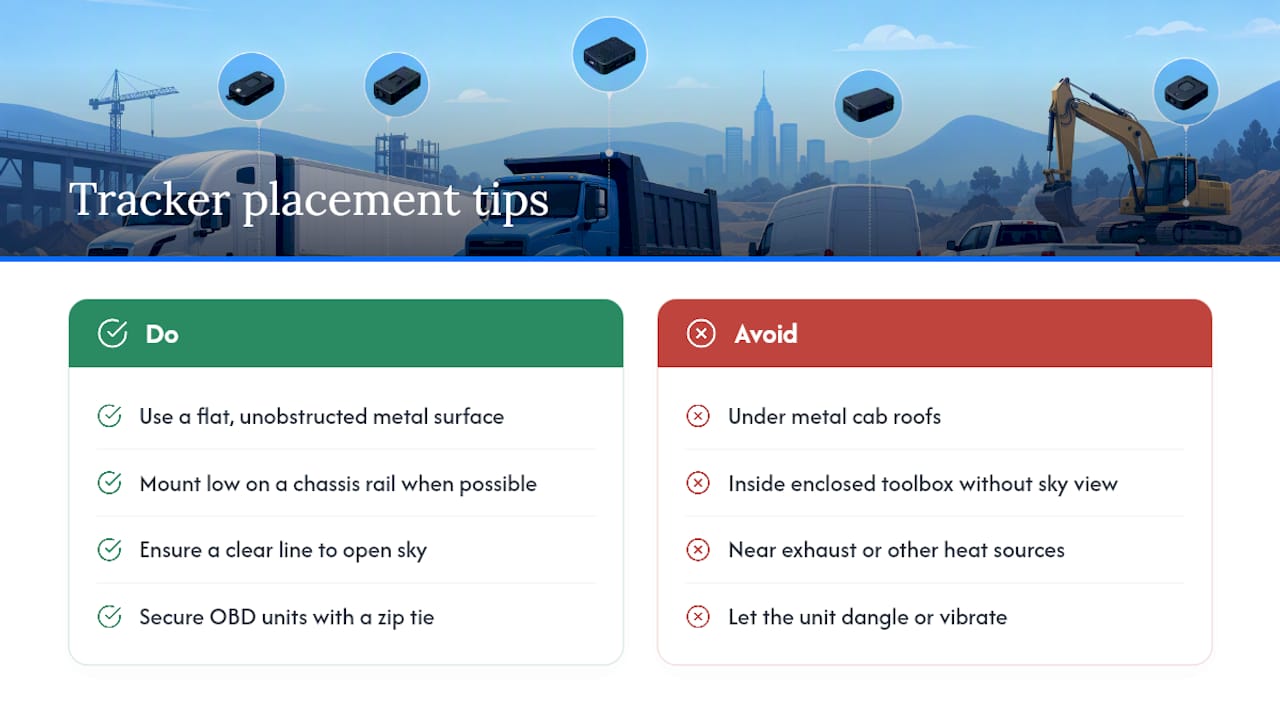
For OBD units, the port location is fixed, so your only real decision is a secure zip tie to stop the unit dangling and taking vibration damage over time. For magnetic and battery trackers, placement is where you have room to get it right. Choose a flat, unobstructed metal surface with a clear line to open sky where possible. GPS signal weakens under metal cab roofs and inside enclosed toolboxes, so a mount low on a chassis rail often out-performs one tucked deep under a tray.
Keep the unit away from exhaust systems and other heat sources, since sustained heat degrades battery life faster than almost anything else. On trailers, mounting near the front, away from the wheel arches, reduces exposure to mud and water thrown up from the road.
Concealment matters mainly for theft-risk assets. A visible tracker is a target for removal, so a second position, tucked inside a toolbox or behind a bumper, adds a layer of resilience if the primary unit gets found and pulled. Just make sure any hidden unit still has a clear enough view of the sky to report reliably. A perfectly concealed tracker that can’t get a GPS fix is no better than no tracker at all.
Why an integrated platform beats a pile of separate trackers
Most fleets don’t run one device type, they run three or four, and that’s where things get messy. An OBD unit on the utes, a magnetic tracker on the trailers, maybe a hardwired unit on the excavator that never leaves site. Reconciling that mix in three different apps is where visibility quietly falls apart.
A single operating view solves that, and it’s the argument for software-first fleet management over a pile of standalone trackers. Software solutions can pull location data into the same platform that runs your pre-starts, dockets and compliance records, so a truck’s position and its paperwork sit in one place rather than two systems that never talk to each other. That connection matters for billing too: when site activity and location data line up automatically, invoicing disputes shrink because you’ve got a real-time record, not a driver’s memory of where they were on Tuesday.
The honest case for this approach isn’t that it replaces good hardware decisions. It’s that hardware alone, no matter how well chosen, doesn’t reduce paperwork or speed up billing. The platform underneath it does.
— Mike
Get GPS visibility without the install headache
Fleet management software can address the mixed-fleet problem this article has walked through: trucks, trailers and machinery that all need tracking but don’t all need a technician under the dash. Such software can integrate plug-and-play GPS tracking directly into the same platform running your pre-starts, dockets and compliance records, so location data feeds straight into the paperwork instead of sitting in a separate app nobody checks.
A demo walks through what that looks like in practice: real-time vehicle and equipment location, digital pre-start and docket records tied to that location data, and compliance documentation that updates itself instead of living in a folder on someone’s desk. If you’re weighing up how to get reliable tracking across a mixed fleet without a drawn-out install project, book a look at Dirt Champ and see how it fits your yard.